
Need to create digital waveforms for documentation or presentations? WavePaint is the most intuitive digital waveform editor available, running entirely in your browser.

What is a Digital Waveform Editor?
A digital waveform editor is a specialized tool for creating visual representations of digital signals. Unlike analog waveforms that vary continuously, digital waveforms show discrete states – typically high (1), low (0), and special states like unknown (X) or high-impedance (Z).
Digital waveform diagrams are essential for:
- Protocol documentation – Showing how data is transmitted in SPI, I2C, UART, and other interfaces
- Hardware specifications – Defining timing requirements for FPGAs, ASICs, and embedded systems
- Educational materials – Teaching digital logic and signal timing concepts
- Debug analysis – Visualizing simulation results and logic analyzer captures
WavePaint: Your Complete Digital Waveform Solution
WavePaint is a powerful digital timing diagram editor that works directly in your browser. Unlike text-based tools like WaveDrom, WavePaint offers an intuitive graphical user interface (GUI) that lets you draw waveforms visually, without writing JSON code.
Draw Waveforms Naturally
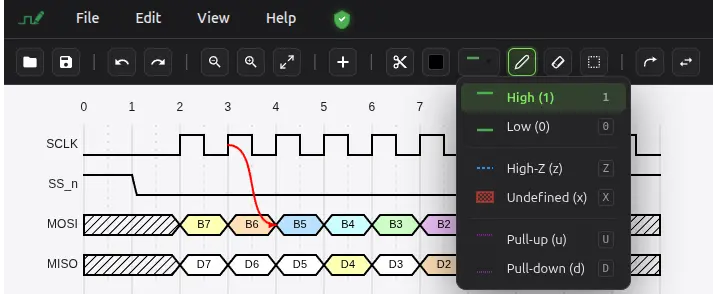
With WavePaint’s paint tool, creating waveforms is as simple as clicking and dragging. Select the state you want (0, 1, X, Z) and paint it onto the timeline. Need to create a clock signal? Use the predefined signal generator to create clocks, counters, PWM signals, and more in one click.
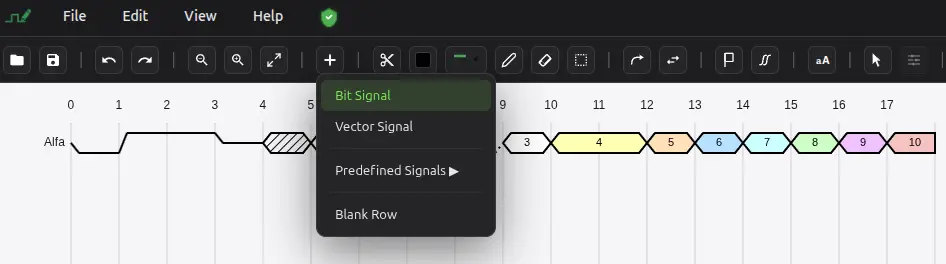
Bit Signals and Vector Signals
Bit signals show single-bit digital values: high, low, unknown, or high-Z. Perfect for clocks, enables, resets, and single-wire interfaces.
Vector signals represent multi-bit buses with hexagonal styling. Display data values in hexadecimal, decimal, or binary format. Add custom labels to each segment to show packet contents, addresses, or command codes.
Professional Styling Options
Customize every aspect of your waveforms:
- Signal colors – Assign unique colors to different signals for clarity
- Segment styling – Color individual bus segments to highlight data phases
- Hatched patterns – Show don’t-care or invalid regions with hatching
- Fill colors – Add fill colors to vector signals for emphasis
- Edge arrows – Add arrows on clock edges to show trigger direction
Predefined Signal Generators
Save time with WavePaint’s built-in signal generators:
- Clock – Regular square wave with configurable frequency
- Counter – Incrementing binary or hex values
- Reset – Active-low or active-high reset pulse
- Pulse – Single pulse with configurable width
- Strobe – Periodic strobe signal
- PWM – Pulse-width modulated signal
- Ramp – Incrementing value ramp
- Walking One/Zero – Shift register patterns
- Gray Code – Gray code sequence
- Alternating – Alternating 0/1 pattern
Export Your Waveforms
WavePaint supports multiple export formats for any workflow:
- PNG – High-quality raster images for documentation
- SVG – Scalable vector graphics for publications
- JPG – Compressed images for presentations
- WaveDrom JSON – Compatible with WaveDrom ecosystem
- VCD – Value Change Dump for simulation tools
- CSV/TXT – Tabular data for spreadsheets
- Stimulus – Format for testbench generation
Works Entirely in Your Browser
WavePaint requires no installation, no plugins, and no account to get started. 100% free. Open the editor and start creating professional digital waveforms immediately. Your data stays on your computer – nothing is uploaded to servers.